JUN 16, 2026 · 18 min read · whatsapp-cloud-api
Building a Plug-and-Play WhatsApp Service for a Multi-Tenant CRM
A hands-on guide to designing a WhatsApp Cloud API integration that any multi-tenant product can plug into, covering Meta setup, Embedded Signup, onboarding, messaging, webhooks, and analytics.
- whatsapp-cloud-api
- whatsapp-business-platform
- meta-embedded-signup
- multi-tenant-crm
- whatsapp-crm-integration
- nestjs
- rabbitmq
- system-design
Building a Plug-and-Play WhatsApp Service for a Multi-Tenant CRM
A client of ours ran a multi-tenant CRM for the fitness industry. Their tenants, mostly gyms and studios, captured leads inside the CRM but had no way to message those leads on WhatsApp without leaving the platform. They would export a list, switch to a separate third-party messaging tool, paste numbers, and send. Every tenant ran the same awkward dance, and they kept asking the same question: why can we not do this inside the CRM?
The client did not want to become WhatsApp experts. They wanted a service they could drop in behind their own backend, expose through their own UI, and offer to every tenant without rebuilding the integration for each one. That is the problem this post walks through: how to design and build a plug-and-play WhatsApp service that any multi-tenant product can integrate.
The post is written for backend engineers and technical architects. It explains how the system works, why the boundaries sit where they do, and how you would implement each piece. The reference material throughout is the official Meta WhatsApp Cloud API documentation and the Embedded Signup documentation.
What you will build
At a high level there are two of your own services, the client's CRM in front of them, and Meta's platform behind them. The diagram below shows how a request flows.

The CRM backend is the only thing that talks to our internal API Service. Meta talks only to our public Webhook Service. Nothing on the public internet can reach the service that holds the send-side credentials. That separation is the spine of the whole design, and the rest of this post is mostly about why.
The vocabulary you need first
WhatsApp's platform has a lot of moving parts, and the names matter. Getting them right early saves a lot of confusion later, so here are the terms this post uses, defined where they first appear.
Your integration starts with a Meta app. The App ID identifies that app, and the App Secret is its private credential. You use the App ID publicly, for example when launching the signup popup, but the App Secret stays on your server and is used to prove your app's identity in server-to-server calls. Treat the App Secret like a password.
When a business connects through Embedded Signup, they do so against a Configuration ID, usually written as config_id. This is a saved signup configuration tied to your app that controls what the popup asks for and which permissions it requests. You create it once in the Meta dashboard and reference it every time you launch the flow.
A WABA, or WhatsApp Business Account, is the top-level account that owns a business's WhatsApp presence. Inside a WABA live business phone numbers, message templates, and settings. Each phone number is identified by a phone_number_id, and the account itself is identified by a waba_id. These two IDs are the handles you use for almost every API call: you send messages and register numbers against a phone_number_id, and you manage templates and webhook subscriptions against a waba_id.
When a business finishes Embedded Signup, the popup hands your front-end a short-lived authorization code. This code is not an access token. It is a temporary credential that your backend exchanges, using the App ID and App Secret, for a longer-lived System User access token (Meta also calls this a business integration system user access token). That token is what authorizes your service to act on behalf of the business.
Before a business phone number can send messages through Cloud API, it has to go through phone number registration, which enables the number for the API and sets a two-step verification PIN. Message templates are the pre-approved message formats required for business-initiated conversations, and they must be approved by Meta before use. Finally, webhooks are the HTTP callbacks Meta sends you when something happens, such as a message being delivered, read, or replied to.
With those terms in hand, the rest of the design falls into place.
Prerequisites: getting your App ID and config_id
Before any code runs, you need a Meta app and an Embedded Signup configuration. People often get stuck here because the steps happen across two different surfaces, the Meta Business Suite and the App Dashboard, and the order matters. Here is the path.
Step 1: Verify your business
Embedded Signup onboards real businesses and, in production, requires advanced permissions. Meta will not grant those to an unverified business, so business verification comes first. You do this in Meta Business Manager under Security Center or Business Settings. You submit your legal business name, address, and supporting documents, and Meta reviews them. This review can take days, so start it early. Until your business is verified, you can build and test, but you cannot onboard outside customers at scale.
Note: Verification is about your business, the one that owns the app. Each tenant that connects later does not have to be verified by you. They go through their own checks inside the Embedded Signup popup.
Step 2: Create the app and add the WhatsApp product
In the Meta App Dashboard, create a new app. Pick the business type so the app is owned by your verified business. Once the app exists, its App ID and App Secret are on the app's settings page. The App Secret should go straight into your secret manager, never into client code or a repo.
Then add two products to the app: WhatsApp and Facebook Login for Business. Embedded Signup is built on top of Facebook Login for Business and the Facebook JavaScript SDK, so both products need to be present. As the docs put it, "Embedded Signup leverages the Facebook Login for Business product and our JavaScript SDK."
Step 3: Create the Embedded Signup configuration
A configuration is what produces your config_id. In the App Dashboard, open Facebook Login for Business, go to Configurations, and create a new one. A configuration bundles together the login type (you want the business login flow for WhatsApp), the assets the flow can touch, and the permissions the flow will request. When you save it, Meta gives you a config_id. That is the value you pass to the SDK alongside your App ID when you launch the popup.
What the permissions in the configuration allow
This is the part worth understanding rather than copying. For a Cloud API integration you attach two permissions to the configuration, and each one unlocks a specific surface. The official descriptions are precise, so they are worth quoting:
- whatsapp_business_management is "necessary if your app needs access to onboarded customer WhatsApp Business Account settings and message templates." In practice this is what lets your service read and manage the tenant's WABA and create or submit message templates.
- whatsapp_business_messaging is "necessary if your app needs access to onboarded customer business phone number settings, or if your app will be used by customers to send and receive messages." This is the permission behind phone number registration and the actual sending of messages.
You will almost always need both. Management without messaging lets you create templates you cannot send; messaging without management lets you send templates you cannot create.
Note on development vs live mode: While your app is in development mode, these permissions appear in the signup flow for anyone with an admin, developer, or tester role on the app, which is enough to test. Once you switch to live mode, only permissions approved for advanced access through App Review will appear. So plan for App Review before you try to onboard real tenants. You will not be able to onboard business customers until your app has been approved for advanced access for each of the permissions it requires.
Your launch URL must be reachable from the internet
The Facebook JavaScript SDK that launches Embedded Signup will only run on a page served over HTTPS from a domain Meta can resolve. You also register an OAuth redirect and allowed domains in the Facebook Login for Business settings, and those have to match the origin the SDK runs on. A page served from localhost over plain HTTP will not work.
If you already have a deployed test or staging environment with a public HTTPS URL, use it. If you are developing locally and have nothing deployed yet, put a tunnel in front of your local server so it gets a temporary public HTTPS URL. A common choice is ngrok:
# expose your local front-end (running on port 3000) over public HTTPS
ngrok http 3000
# ngrok prints a URL like https://a1b2c3d4.ngrok-free.app
Then add that ngrok URL to your app's allowed domains and OAuth redirect settings, and serve the page that loads the SDK from it. When the tunnel URL changes, update the settings again. The same rule applies to the Webhook Service later: Meta has to reach it over public HTTPS to deliver events, so it needs a real public URL or a tunnel too.
The shape of the system
The service is built in TypeScript on NestJS, backed by PostgreSQL, with RabbitMQ handling asynchronous work. The client's CRM runs on MongoDB, which matters to us only as the place tenants live, since we map our records back to their tenants.
Two separate services make up the integration, and keeping them separate is a deliberate security decision rather than an accident of organization.
The first is the Webhook Service. It is publicly reachable, because Meta has to be able to call it from the open internet. Its only job is to ingest inbound events from the WhatsApp webhook, things like message delivered, message read, and inbound replies, validate them, and pass them along for storage. It receives data. It does not hold the credentials that send messages or manage accounts.
The second is the WhatsApp API Service. This is internal middleware that sits between the client's CRM backend and the WhatsApp Cloud API. The CRM backend calls our WhatsApp API Service, and our service calls Meta. It is never exposed to the public internet. Only internal services, such as the CRM backend, can reach it.
That boundary is worth dwelling on. The WhatsApp API Service holds the keys to the kingdom: the App Secret, and the System User access tokens for every connected business. If that service were public, a single misconfigured route or leaked token would expose every tenant's WhatsApp account. By keeping it internal and forcing all access through the CRM backend, you get credential isolation. The sensitive credentials live in a service with no public attack surface, and the only thing on the public internet is a webhook receiver that holds no send-side secrets. If you remember one architectural decision from this post, make it this one.
Who is allowed to do what
A multi-tenant integration lives or dies on its authorization model, and the cleanest decision we made was to not own authorization at all.
The client's CRM backend owns authentication and authorization. It already knows who its users are, which tenant they belong to, and what they are allowed to do. It decides whether a given tenant or user may enable or use WhatsApp, it validates the request, and only then does it forward the request to our service. Our service trusts that the CRM backend has already done that check, because the CRM backend is the only thing that can reach it.
We did not build a front-end. We exposed a set of backend endpoints, and the client integrated those endpoints into their own UI and gated them with their own feature flags. This is what makes the service plug-and-play. Any product with its own auth system and its own notion of tenants can sit in front of it. We are not in the business of deciding who gets to send WhatsApp messages; we are in the business of sending them once someone with authority has said yes.
Note: Because the API Service trusts its caller, the network boundary is the authorization boundary. Lock the service to the internal network with an allowlist, mutual TLS, or a signed service-to-service token, and never give it a public route. If that boundary leaks, the trust model leaks with it.
The data model
Our Postgres schema centers on one entity: the Business. A Business maps one-to-one to a CRM tenant. We store the tenant's ID on the Business as a foreign key, and that ID is the thread that ties our Postgres records back to the tenant record in the client's MongoDB CRM. When the CRM backend talks to us, it speaks in tenant IDs, and we resolve those to Businesses.
Below the Business sits a small hierarchy.
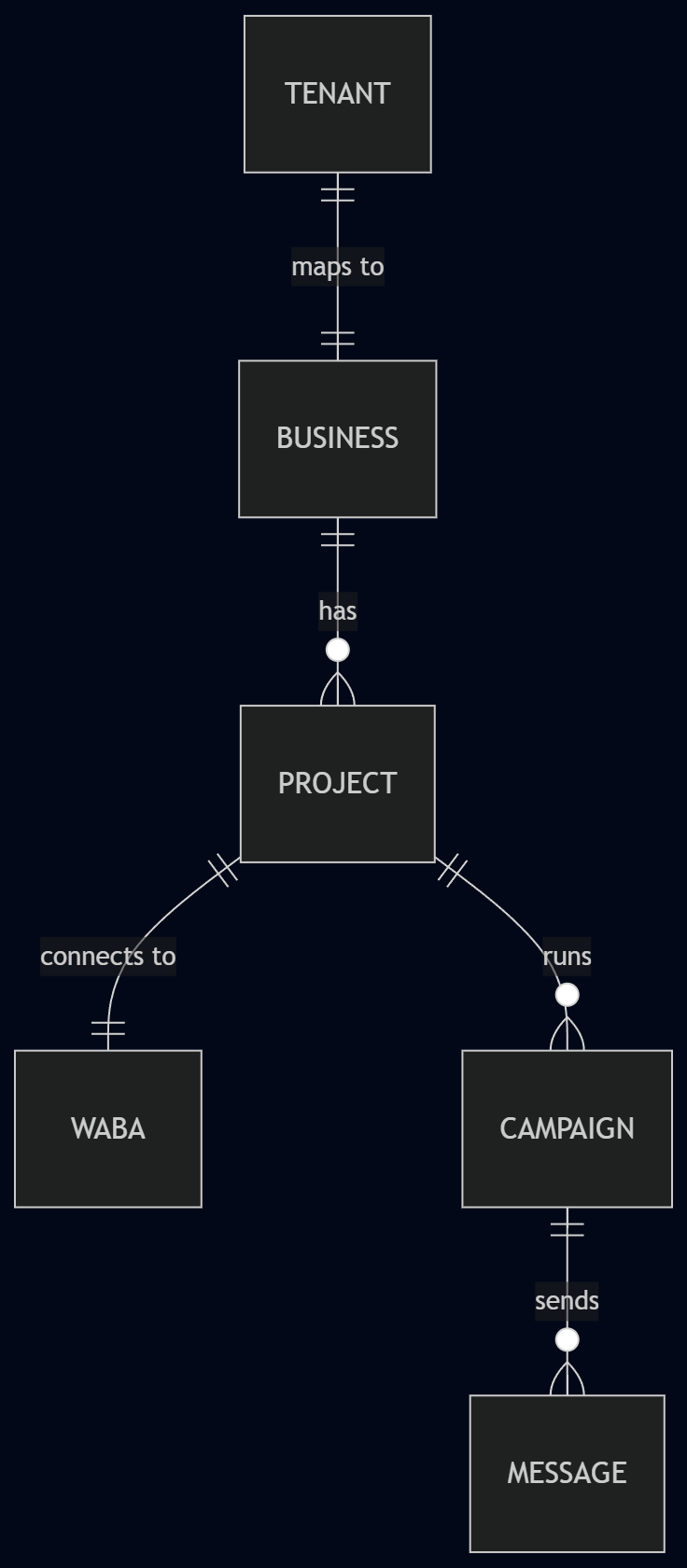
So the relationships read as: tenant one-to-one Business, Business one-to-many Projects, and Project one-to-one WABA. A Project is the unit that owns a WhatsApp connection. The phone_number_id and waba_id for that account live on the Project, which lets a single tenant run more than one WhatsApp presence, for example a separate number per location, while keeping each connection isolated.
Kept short, the two core tables look like this:
CREATE TABLE businesses (
  id          UUID PRIMARY KEY DEFAULT gen_random_uuid(),
  tenant_id   TEXT NOT NULL UNIQUE,   -- FK back to the CRM's MongoDB tenant
  created_at  TIMESTAMPTZ NOT NULL DEFAULT now()
);

CREATE TABLE projects (
  id               UUID PRIMARY KEY DEFAULT gen_random_uuid(),
  business_id      UUID NOT NULL REFERENCES businesses(id),
  waba_id          TEXT,
  phone_number_id  TEXT,
  access_token     TEXT,              -- System User token, encrypted at rest
  status           TEXT NOT NULL DEFAULT 'pending', -- pending | active | failed
  created_at       TIMESTAMPTZ NOT NULL DEFAULT now()
);
The status column on projects is small but load-bearing. Only a Project in active status can be chosen when sending, which is how onboarding state gates messaging.
Onboarding with Embedded Signup
Embedded Signup is the Meta flow that lets a business connect their own WhatsApp Business Account to your app without you ever touching their Meta credentials. It runs inside a Facebook Login for Business popup. Here is the full sequence.
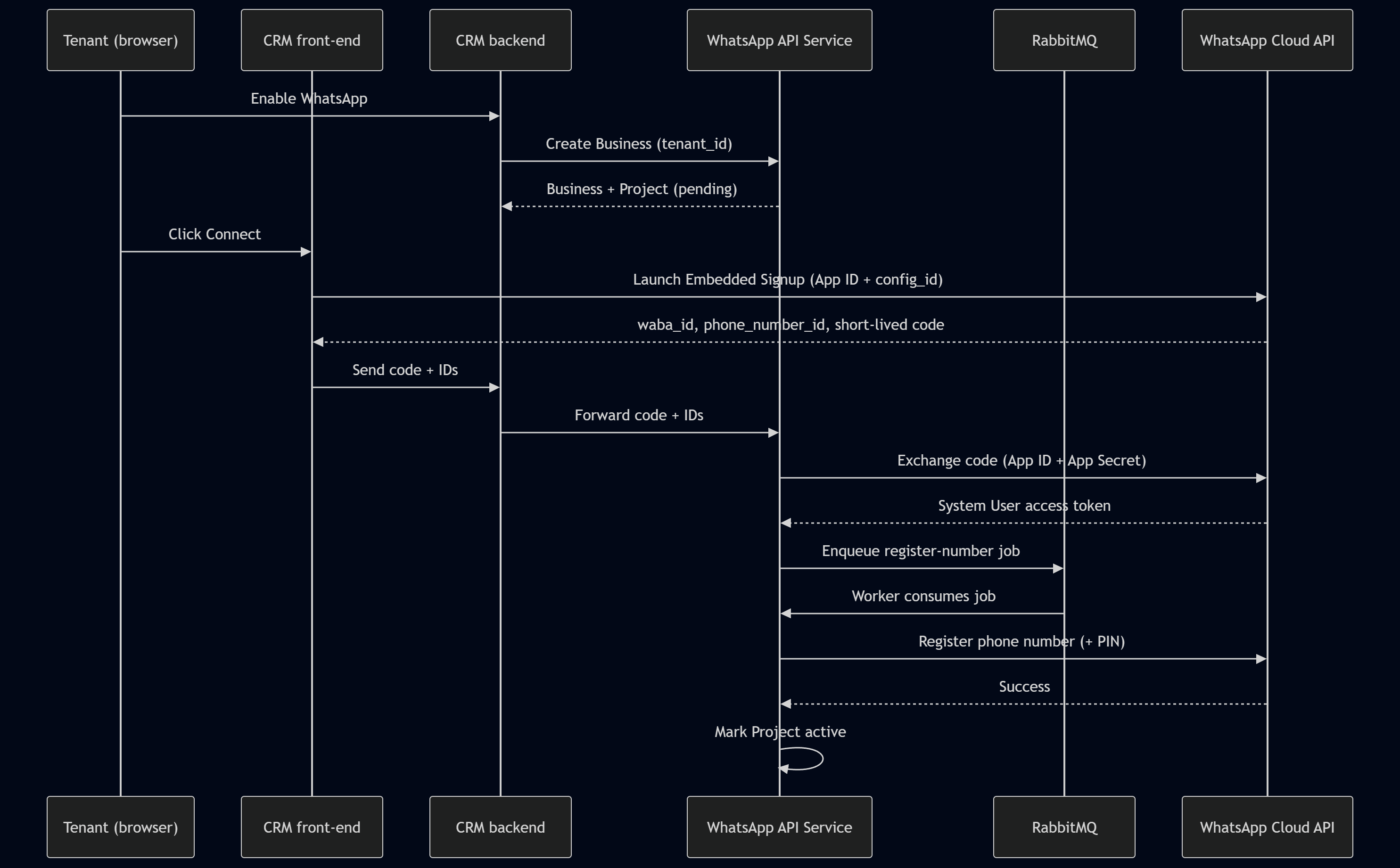
It begins when a tenant enables WhatsApp in the CRM. The CRM backend calls our service, and we create a Business record keyed by the tenant ID, plus a pending Project. The endpoint our service exposes is internal and intentionally thin:
// Internal API Service. Only the CRM backend can reach this.
@Post('businesses')
async createBusiness(@Body() dto: CreateBusinessDto) {
  // The CRM backend has already authorized this tenant.
  return this.businessService.createForTenant(dto.tenantId);
}
The tenant then sees a Connect button. Clicking it launches Embedded Signup through the Facebook Login for Business popup, configured with the App ID and the config_id. On the front-end that call is roughly:
// Front-end, served from a public HTTPS origin (see the ngrok note above).
FB.login(callback, {
  config_id: '<YOUR_CONFIG_ID>',
  response_type: 'code',     // ask for the short-lived authorization code
  override_default_response_type: true,
});
Inside the popup the tenant selects an existing WABA or creates a new one, works through Meta's steps, and handles payment setup. All of this happens on Meta's domain. Your code never sees the tenant's Facebook password.
When the tenant finishes, the popup returns three things to the front-end: the tenant's waba_id, their phone_number_id, and a short-lived authorization code. The documentation is explicit: "Embedded Signup returns the customer's WABA ID, business phone number ID, and an exchangeable token code, to the window that spawned the flow. You must send this data to your server."
So the front-end sends the code and IDs to the CRM backend, which forwards them to our WhatsApp API Service. The exchange has to happen on the backend for two reasons. First, it requires the App Secret, which must never reach the browser. Second, the code is short-lived, so it has to be exchanged promptly. A code that sits in a queue for too long is a dead code.
On the backend, our service exchanges the code for a System User access token by calling Meta's token endpoint with the App ID, the App Secret, and the code:
GET /oauth/access_token
  ?client_id={app-id}
  &client_secret={app-secret}
  &code={short-lived-code}
The response carries the token, which we store against the Project, encrypted at rest, because every future call on behalf of this business will use it.
With the token in hand we do not register the number inline. Registration is a network call that can be slow or fail transiently, so we publish a job to RabbitMQ and let a worker handle it.
// After a successful code exchange, hand off registration to the queue.
await this.queue.publish('whatsapp.register', {
  projectId: project.id,
  phoneNumberId: project.phoneNumberId,
  pin: generateSixDigitPin(),   // the two-step verification PIN
});
The worker registers the number against the phone_number_id and sets the two-step verification PIN that Meta requires:
POST /{phone-number-id}/register
{
  "messaging_product": "whatsapp",
  "pin": "{six-digit-pin}"
}
Store the PIN, because you will need it again if the number is ever re-registered.
When registration succeeds, the job completes and we mark the Project as active. This flag gates everything downstream: only active Projects can be selected when sending. If registration fails, the Project stays inactive, the worker retries, and the tenant is never handed a half-connected account that looks ready but is not.
Note: This onboarding stage is also where you subscribe your app to webhooks on the customer's WABA, so delivery and read events start flowing to your Webhook Service. The Embedded Signup docs list webhook subscription as one of the required server-side steps alongside the code exchange and registration.
Sending messages
Because the CRM owns authorization, our service keeps its messaging responsibilities narrow: campaigns and sending.
Campaigns
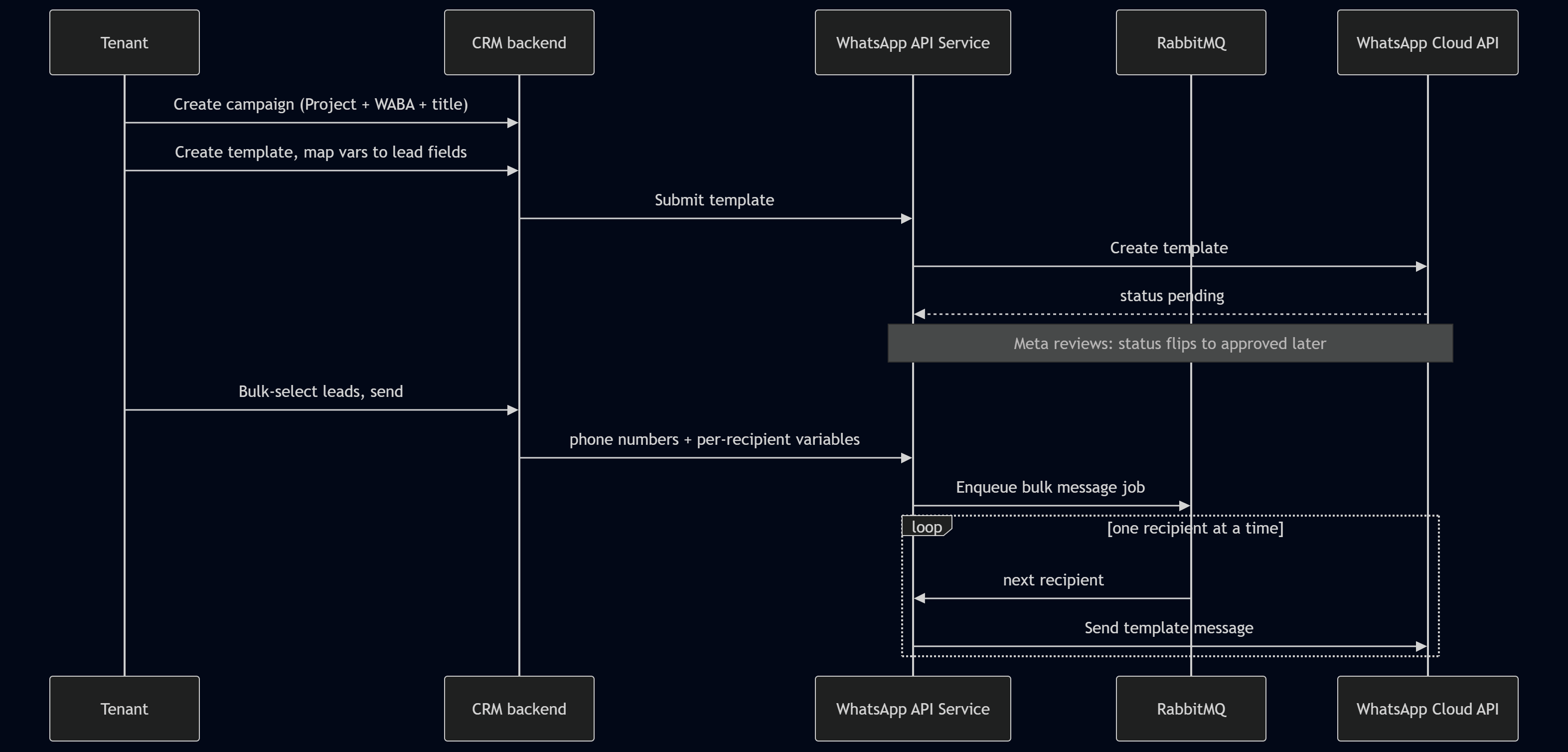
A campaign is the container for a messaging effort. A user creates one in the CRM and, as part of creation, selects the Project and WABA to send from, gives it a title, and attaches whatever metadata the CRM tracks. The Project selection is constrained to active Projects only, which is where the active flag from onboarding pays off. A campaign tied to an inactive number would fail at send time, so we prevent it at creation time.
Templates
WhatsApp requires approved templates for business-initiated messages, so templates are a first-class part of the flow.
A tenant creates a template and maps each template variable to a lead field in the CRM. A template that greets a lead by name has a variable, and the tenant maps that variable to the lead's name field. For each mapping the tenant also sets a configurable default value, used when a lead is missing that field. If a lead has no first name on file, the default might be "there", so the message reads "Hi there" rather than breaking.
The template is submitted through our service to the WhatsApp Cloud API and stays pending until Meta reviews and approves it. This review is not instant and is not under your control, so the system models the wait. We store the template with its status and update it as Meta moves it through review. Once approved, the template is referenced by its ID rather than by re-sending its body each time. A trimmed creation payload looks like this:
{
  "name": "lead_welcome",
  "language": "en_US",
  "category": "MARKETING",
  "components": [
    { "type": "BODY", "text": "Hi {{1}}, welcome to {{2}}!" }
  ]
}
The send
Sending happens inside a campaign. The tenant bulk-selects leads in the CRM, which is the right place for it, since the CRM owns the lead data and the auth around it. The CRM populates the template variables from each lead's fields, applies the defaults where a field is missing, and sends our service a list of phone numbers with their per-recipient variables.
Our service does not send all of those in a tight loop on the request thread. It enqueues a bulk message job in RabbitMQ, and a worker drains the queue, sending to each number one at a time:
@MessagePattern('whatsapp.bulk-send')
async handleBulkSend(@Payload() job: BulkSendJob) {
  for (const recipient of job.recipients) {
    await this.whatsapp.sendTemplate({
      phoneNumberId: job.phoneNumberId,
      to: recipient.phone,
      templateId: job.templateId,
      variables: recipient.variables,   // already filled by the CRM
    });
    // one at a time: respects rate limits, isolates failures
  }
}
Processing one recipient at a time through a queue gives you several things at once: you stay within rate limits, a single bad number does not sink the batch, failures can be retried in isolation, and a campaign of fifty thousand recipients does not hold a connection open or time out. The queue is what turns "send to a list" into something operationally safe.
Closing the loop with webhooks and analytics
A message you send but cannot measure is only half a feature. This is where the Webhook Service earns its place.
Meta calls the Webhook Service whenever a message changes state or a lead replies, sending delivery events, read events, and inbound replies. Two things have to happen on every inbound call. First, you verify the payload is really from Meta by checking the signature header, which Meta computes as an HMAC SHA-256 of the request body using your App Secret. Second, you attribute the event back to the campaign and recipient it belongs to.
// Public Webhook Service: verify the signature before trusting anything.
verifySignature(rawBody: Buffer, header: string): boolean {
  const expected =
    'sha256=' +
    createHmac('sha256', APP_SECRET).update(rawBody).digest('hex');
  return timingSafeEqual(Buffer.from(expected), Buffer.from(header));
}
Note: Always verify against the raw request body, not a re-serialized object. If your framework parses JSON before you hash it, the bytes can differ and the check will fail. In NestJS, capture the raw body for the webhook route specifically.
Because every send was tied to a campaign and a Project, each verified event can be matched to the right campaign and stored as analytics. The sending tenant then sees, per campaign, a clear picture: how many recipients the message reached, how many were delivered, how many failed, and how many replied. Those four numbers turn a fire-and-forget blast into something a gym owner can reason about, and they close the loop the third-party tools never closed inside the CRM.
Why the design holds together
Step back and the system is four ideas working together.
The split between a public Webhook Service and an internal WhatsApp API Service isolates credentials, so the only thing exposed to the internet is a receiver that holds no send-side secrets. The decision to let the CRM backend own authorization keeps the service plug-and-play, so any multi-tenant product can sit in front of it without us learning anything about its users. The Business and Project hierarchy maps cleanly onto Meta's own WABA and phone-number model, so there is no impedance mismatch between our records and theirs. And RabbitMQ absorbs the slow, failure-prone work of registration and bulk sending, so user-facing requests stay fast and nothing is lost when Meta has a bad minute.
None of these pieces is exotic on its own. The value is in where the boundaries sit. Put the credentials where the internet cannot reach them, let the system that already knows your users decide who is allowed to act, model your data the way the platform models its own, and push anything slow onto a queue. Do that, and you have a WhatsApp integration that one CRM can use today and any other multi-tenant product can adopt tomorrow.
References
- Meta, WhatsApp Cloud API documentation. https://developers.facebook.com/docs/whatsapp/cloud-api
- Meta, WhatsApp Cloud API Get Started guide. https://developers.facebook.com/docs/whatsapp/cloud-api/get-started
- Meta, Embedded Signup documentation. https://developers.facebook.com/docs/whatsapp/embedded-signup
- Meta, WhatsApp Business Platform permissions reference. https://developers.facebook.com/docs/permissions
- Meta, Business verification in Meta Business Manager. https://www.facebook.com/business/help/2058515294227817
- Meta, Webhooks for WhatsApp Business Accounts. https://developers.facebook.com/docs/whatsapp/cloud-api/guides/set-up-webhooks
- Meta, Message templates. https://developers.facebook.com/docs/whatsapp/business-management-api/message-templates
- ngrok documentation. https://ngrok.com/docs